Trigger Orders#
The trigger price is the price at which the order begins to execute. Until the trigger is reached, the order sits inactive; once the market reaches the trigger price, the order activates and execution starts.
Any execution algo (TWAP, VWAP, POV, Iceberg, IS and Scale) can be armed with a trigger. You set it in either of two places, and the two stay in sync:
- directly in the order form, with + Trigger on the conditions line — see Set a trigger from the order form below;
- in the Trigger Price tab of Advanced Settings.
Market and Limit orders cannot carry a trigger.
Above and Below describe where the trigger sits relative to the current market price — not which way you are trading. Either condition works with a buy or a sell. In the order form the same two conditions are written as ≥ (Above: the order starts when the price rises to the trigger) and ≤ (Below: the order starts when the price falls to the trigger).
Default direction: a BUY defaults to Below (≤) — it waits for a dip — and a SELL defaults to Above (≥) — it waits for a rise. You can switch the direction in both places.
Set a trigger from the order form#
Once you pick an algo, a quiet line sits below the trading style row (and below the pre-trade tile, when it is shown), just above Advanced Settings. With nothing set it reads + Trigger and + Limit (Scale shows + Trigger only). On futures it also holds the RO (Reduce only) chip at the end.
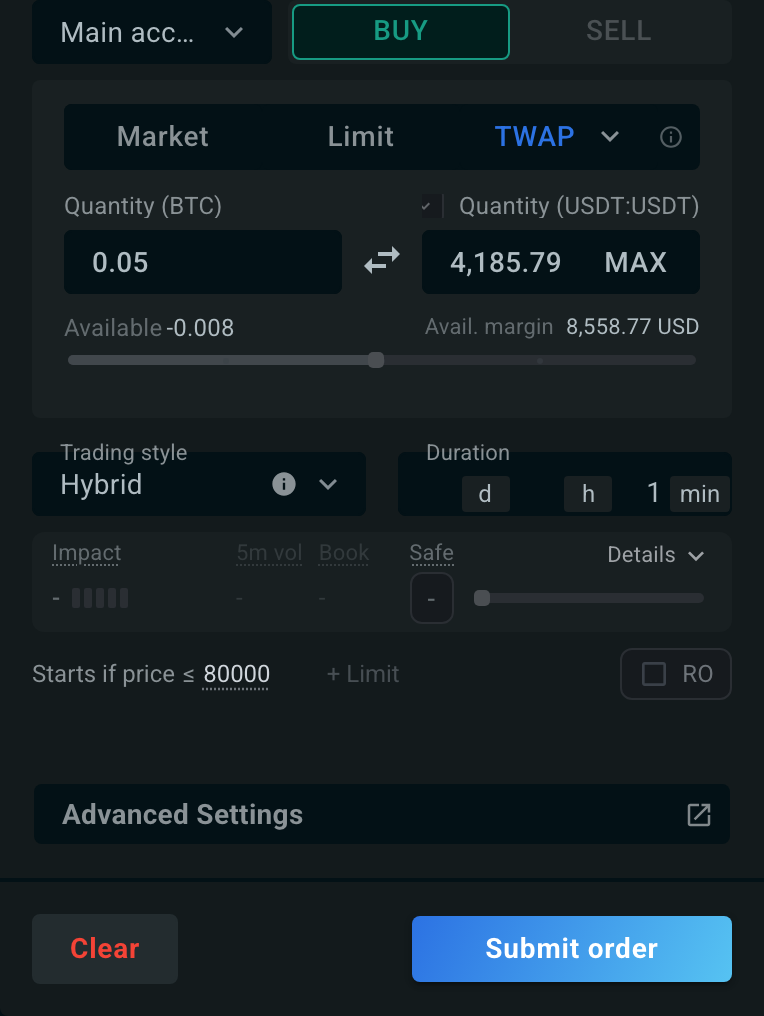
- Click + Trigger. A small price field opens; its placeholder shows the last price.
- Type your trigger price. The ≥ / ≤ toggle next to it sets the direction ("Switch: price rises above (≥) or falls below (≤)"); it starts on the default for your side.
- Press Enter to set it, or Esc to cancel without changing anything.
The line now reads the condition as a sentence, for example Starts if price ≤ 80000 on a buy, or Starts if price ≥ 2500 on a sell. Hover it to see the plain-language version — "The order waits and starts only once the price falls to 80000 or below." Click the underlined price to edit it, or the × next to it to remove the trigger. On a narrow order form the words shorten to Start.
+ Limit works the same way and sets the order's limit price: the line then reads Pauses if price > X on a buy or Pauses if price < X on a sell (Pause on a narrow form). Beyond that price, execution pauses, so the order may not complete.
Anything you set here also appears in the Trigger Price and Limit Price tabs of Advanced Settings, and the other way round.
Below#
Trigger Price "Below" means the trigger price is below the current market price: the order stays inactive while the market is above it, and starts when the market price falls to the trigger.
For example, $ETH is trading at 2,000. You set a trigger price of 1,500 with the condition "Below". The order will only start once $ETH falls to 1,500 — whether that order is a buy (you want to accumulate on a dip) or a sell (you want to exit if the market breaks down).
Above#
Trigger Price "Above" means the trigger price is above the current market price: the order stays inactive while the market is below it, and starts when the market price rises to the trigger.
For example, $ETH is trading at 2,000. You set a trigger price of 2,500 with the condition "Above". The order will only start once $ETH reaches 2,500 — whether that order is a sell (you want to take profit into strength) or a buy (you want to add once the market confirms a breakout).
Behavior summary#
| Scenario | Mechanism | Chart |
|---|---|---|
| Price is over "Trigger Price Below ▼" | Execution is inactive and starts if the trigger price is reached. | 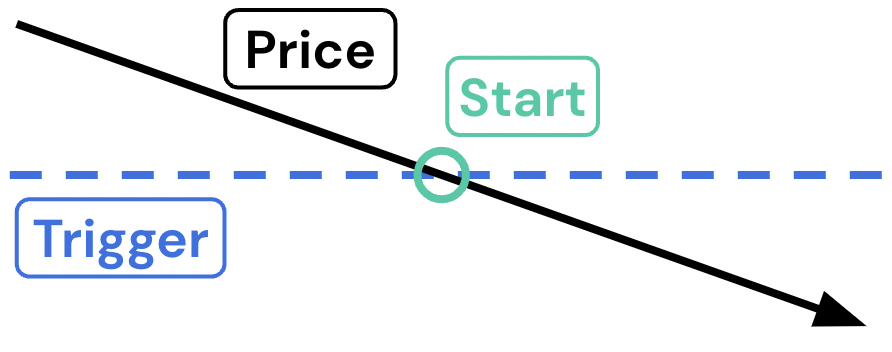 |
| Price is under "Trigger Price Above ▲" | Execution is inactive and starts if the trigger price is reached. | 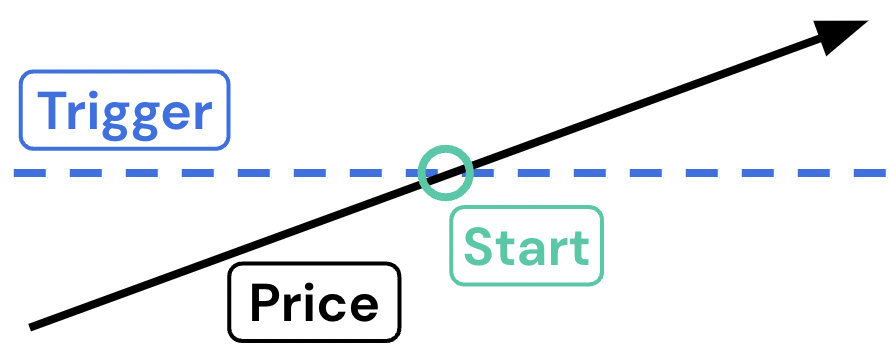 |
While the order waits#
An armed order does not appear with your working orders — it waits in the Trigger orders tab, where you can review or cancel it before it fires. Once the trigger condition is met, the order moves out of that tab and starts executing as a normal parent order.
If the market never reaches your trigger price, nothing executes: the order simply sits there until it reaches its expiration (30 days by default, or the 1-week or 1-month value you chose under Advanced settings > Expiration), and is then dropped. Cancel it yourself at any point from the Trigger orders tab if you no longer want it.
In the mobile view, armed orders are listed under Trigger with their phase: Waiting, Triggered at a price, or Resting at limit.