Order types#
Most orders you place on Anboto are one of three things: a Market order, a Limit order, or an execution algo that works your size over time. On top of those, any algo can be armed with a trigger so it only starts at your price — straight from the order form with + Trigger, or in Advanced settings — and multi-leg orders let you trade two instruments as one ticket.
Market and Limit#
The two simple order types behave the way they do on any venue, and are placed from the same order form as the algos.
| Order type | How it behaves | When to use it |
|---|---|---|
| Market | Sends your full quantity immediately at the best price available, taking liquidity from the book. You do not set a price, so the fill price depends on the book at that moment (on Hyperliquid and Lighter a price bound applies — see the note below). | Small size, or when getting done right now matters more than the price. |
| Limit | Rests at the price you set and fills only at that price or better, adding liquidity to the book. It may not fill at all. | You have a price in mind and are willing to wait for the market to come to you. |
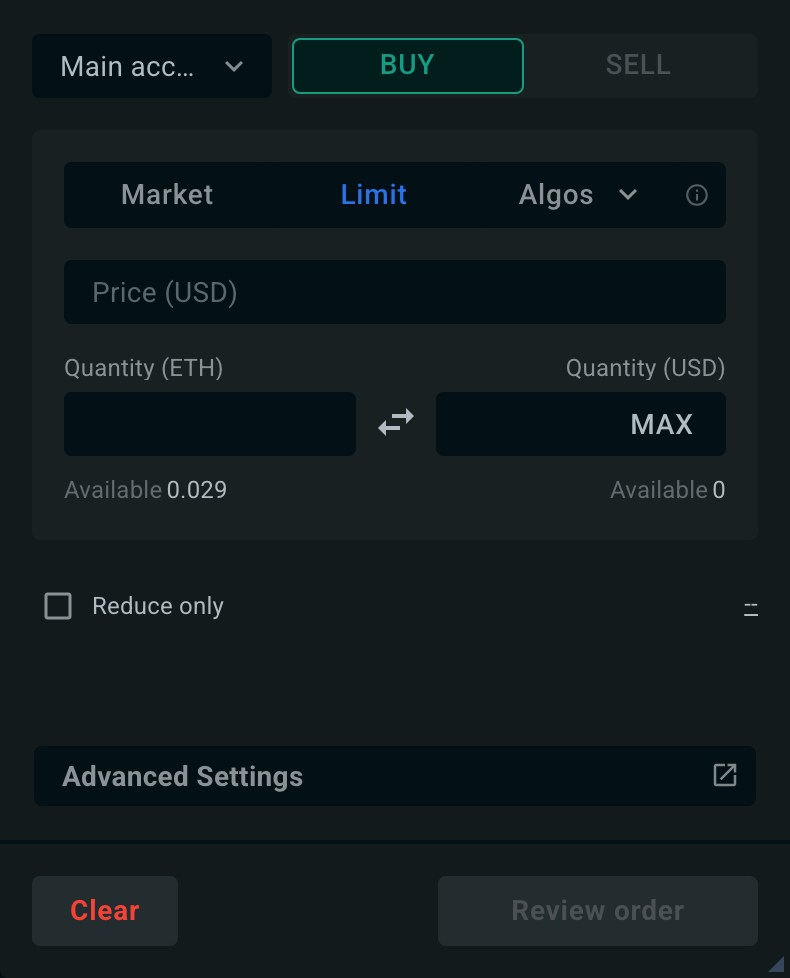
The top row of the order form is Market | Limit | algo dropdown. Select Market or Limit for a simple order, or open the dropdown on the right — it holds TWAP, VWAP, Iceberg, POV, IS and Scale — to place an algo. The account picker and the BUY/SELL switch sit above that row, and the symbol comes from the widget or chart your order form is attached to, so there is no symbol field in the form itself.
Then enter your quantity — and, for a limit order, the price.
Market orders on Hyperliquid and Lighter
On these two venues a market order carries a price bound: it is sent as immediate-or-cancel with a worst price about 5% above the best ask for a buy, or 5% below the best bid for a sell. Nothing fills beyond that bound.
Note
A limit order rests as a single order at one price. To work a large order at a price without showing your full size, use Iceberg; to spread it across a range of prices, use Scale.
Execution algos#
Execution algos break large orders into smaller child orders and work them intelligently across CEXs and perp-DEXs, so you can move size without moving the market. Each algo optimizes for a different benchmark and market condition — the table below helps you pick the right one for your trade.
| Algo | What it optimizes | Typical use case |
|---|---|---|
| TWAP | Execution price close to the time-weighted average price | Trading evenly over a set period (hours to days), especially large orders in illiquid markets |
| VWAP | Execution price close to the volume-weighted average price | Volume-adjusted execution over longer periods (days to weeks), low-liquidity environments |
| POV | Predictable market impact via a fixed participation rate, with a pre-trade impact, time and Safe view | Following the market's natural rhythm, expressing urgency through the participation rate |
| Iceberg | Discretion — hiding total order size at a chosen price | Working a large order at a predefined price within seconds to minutes |
| Implementation Shortfall (IS) | The gap between decision price and final execution price | Large block trades in volatile or low-liquidity markets, urgency-driven pacing |
| Scale | Distribution of size across a range of price levels | Building positions across multiple price levels, cost averaging, volatile markets |
Pick by intent#
If you'd rather choose by what you want than by acronym:
| I want to… | Use |
|---|---|
| Get filled right now, whatever the price | Market |
| Wait for my price and not chase the market | Limit |
| Get a large order done quietly over a fixed window | TWAP |
| Track the market's traded volume, not the clock | VWAP |
| Never be more than X% of the market's volume | POV |
| Sit at my price without showing my full size | Iceberg |
| Get it done fast while minimizing the cost of urgency | Implementation Shortfall |
| Ladder into a position across a price range | Scale |
| Only start executing when price reaches my level | Any algo + a trigger |
| Fill everything if the market touches a "get-it-done" price | Any algo + a Would Price (see Advanced settings) |
Any algo can also be armed with a trigger price so execution only starts once the market reaches your level.
Note
Execution algos share a common set of advanced settings — Would Price, Limit Price, Trigger Price, Maker Placement, Clip Size, and Expiration — and some add a tab of their own, such as PoV Risk, Urgency, Iceberg Delay, or Scale Profile. Each algo page documents the ones that apply to it. The trigger and limit prices can also be set right in the order form, with + Trigger and + Limit on the conditions line; see Trigger Orders.